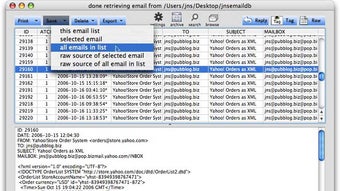



Download MailSteward – Email Archiving, Mac, Free Trial
Overview
MailSteward is a specialized email‑archiving tool designed exclusively for macOS users who need a reliable, searchable repository for all their incoming and outgoing messages. First launched on Softonic in early 2006, the application has evolved through multiple updates and now sits at version 9.1.1. While the software is offered as a trial version, it provides full access to core features such as automatic message import, powerful filtering, and robust export options.
The primary goal of MailSteward is to help professionals, small businesses, and even hobbyists keep a permanent, secure copy of their email correspondence without relying on the native mail client’s limited storage capabilities. The trial is completely free to download, and it runs on any Mac that meets the minimum requirement of macOS X or later. Although the interface is only available in English, the underlying engine is built on a solid SQLite database, ensuring fast indexing and rapid search results even when the archive grows into the gigabyte range.
Users who value compliance, data retention policies, or simply want an organized backup of personal communications will find MailSteward a valuable addition to their productivity toolbox. In terms of security, the software respects macOS’s sandboxing rules and stores archives locally unless the user explicitly chooses a cloud‑based backup solution. Regular updates are released to keep the app compatible with the latest macOS releases, and the trial version includes notifications for any critical patches.
While MailSteward does not have native Windows, Android, or iOS versions, its focus on macOS makes it a niche but highly polished solution within the broader category of email client utilities and archiving apps.
Key Features
- Automatic Email Import: Seamlessly pulls messages from the built‑in Mail app, Gmail, Exchange, and other IMAP/POP accounts without manual intervention.
- Full‑Text Search Engine: Powered by SQLite, it indexes every word in subject lines, bodies, and attachments, delivering instant results.
- Advanced Filtering & Tagging: Create custom rules to tag, move, or delete messages as they are archived, keeping the database tidy.
- Secure Local Storage: Archives are saved on the Mac’s hard drive with optional password protection, ensuring data stays private.
- Export Options: Export selected emails or entire folders to PDF, EML, or CSV formats for easy sharing or compliance reporting.
- Incremental Updates: After the initial import, MailSteward only adds new messages, reducing processing time and disk usage.
- Backup & Restore: Built‑in tools let you back up the archive to an external drive or Time Machine, and restore it in seconds.
- Customizable Interface: Choose between list view, preview pane, or a minimal layout, adapting to personal workflow preferences.
- Regular Updates: The development team releases security patches and compatibility updates for the latest macOS releases.
- Free Trial Access: No credit card required; the trial provides unrestricted use of all features for a limited period.
These features collectively position MailSteward as a robust, all‑in‑one email archiving solution for Mac users. Whether you need to comply with corporate retention policies, safeguard personal correspondence, or simply free up space in your primary mail client, the tool offers a secure and scalable approach. The ability to search through attachments, combined with granular filtering, makes it especially useful for legal professionals and researchers who often need to locate a single phrase within a massive corpus of messages. Additionally, the export capabilities ensure that archived data can be shared across platforms—even though the app itself does not run on Windows, Android, or iOS, the exported files remain universally readable.
Installation & Usage Guide
Getting started with MailSteward is straightforward, even for users who are new to email archiving tools. Follow these steps to download, install, and begin archiving your messages:
- Download the Installer: Visit the official Softonic page for MailSteward and click the “Download Free Trial” button. The file is a standard
.dmgpackage, sized under 50 MB, making it quick to download even on slower connections. - Mount the Disk Image: Double‑click the downloaded
.dmgfile. macOS will automatically mount it as a virtual drive and display the MailSteward icon alongside a shortcut to the Applications folder. - Copy to Applications: Drag the MailSteward icon into the Applications folder. This step ensures the app is properly registered with macOS and can receive automatic updates via the built‑in Software Update mechanism.
- Launch the App: Open MailSteward from the Applications folder or use Spotlight (⌘ Space) and type “MailSteward.” The first launch will prompt you to grant access to your Mail data; this permission is required for the automatic import feature.
- Configure Import Settings: In the Preferences window, select the email accounts you want to archive. You can choose to import all existing messages or start with a fresh import that only captures new incoming mail.
- Set Up Filters (Optional): Use the “Rules” tab to create custom filters—e.g., tag all newsletters, move internal communications to a separate folder, or automatically delete spam before it reaches the archive.
- Start Archiving: Click “Begin Import.” Depending on the size of your mailbox, the initial scan may take several minutes. Subsequent imports are incremental and usually complete within seconds.
- Search & Retrieve: Use the search bar at the top of the main window to locate messages by keyword, sender, date range, or attachment type. The results appear instantly thanks to the indexed database.
- Export When Needed: Select one or multiple messages, right‑click, and choose “Export.” Pick the desired format (PDF, EML, CSV) and destination folder.
Throughout the process, MailSteward provides clear status notifications, and the trial version includes a “Help” menu with links to a knowledge base and community forums. Because the software is a native macOS app, it benefits from the operating system’s security model, meaning the archive is stored in a sandboxed location unless you explicitly move it. Users who prefer a command‑line approach can also access the underlying SQLite database for advanced queries, although this is optional and not required for everyday use.
Compatibility & System Requirements
MailSteward is built specifically for the macOS ecosystem. The minimum supported operating system is macOS X (10.5) and newer, which includes macOS Big Sur, Monterey, Ventura, and the latest Sonoma release. Because the software leverages native Apple frameworks for mail access and file handling, it does not run on Windows, Linux, Android, or iOS devices. However, the exported archives (PDF, EML, CSV) are universally readable on any platform, allowing you to share or view archived messages from a Windows PC or a mobile device if needed.
Hardware Recommendations: While MailSteward can run on older Mac hardware, a modern Intel or Apple Silicon processor (M1/M2) paired with at least 4 GB of RAM ensures smooth indexing and quick search performance. For large mailboxes (over 50 GB), consider allocating additional SSD space to keep the archive and index files on a fast drive.
Software Dependencies: The app requires the built‑in Mail application or any IMAP/POP account configured in macOS System Preferences. No additional runtime libraries or plugins are needed. Security updates are delivered through the macOS Software Update channel, and the trial version automatically checks for new releases each time it launches.
Internationalization: Currently, MailSteward is only available in English. Users who need localized interfaces will need to rely on the English UI, though the underlying archive supports Unicode characters, allowing you to store and search messages in any language.
Pros and Cons
Advantages
- Free trial provides full access to all features without a credit card.
- Powerful full‑text search across subject, body, and attachments.
- Automatic incremental import saves time after the initial setup.
- Secure local storage with optional password protection.
- Multiple export formats (PDF, EML, CSV) ensure cross‑platform compatibility.
- Robust filtering and tagging for organized archiving.
- Regular updates keep the software compatible with the latest macOS releases.
Disadvantages
- Limited to macOS; no native Windows, Android, or iOS versions.
- Interface available only in English, which may deter non‑English speakers.
- Trial period ends, requiring purchase for continued use.
- Initial import of very large mailboxes can be time‑consuming.
- No built‑in cloud sync; users must rely on external backup solutions.
Frequently Asked Questions
Is MailSteward free after the trial?
No, the trial version is free for a limited period. Once the trial expires, you need to purchase a license to continue using the software. The license is a one‑time payment that includes future minor updates.
Can I archive Gmail and Outlook accounts?
Yes. MailSteward connects to any IMAP or POP account that is configured in macOS Mail, including Gmail, Outlook.com, Exchange, and other popular services. The app imports messages directly from the Mail app’s local store.
How secure is the archived data?
The archive is stored locally on your Mac’s hard drive. You can enable password protection, and the files are saved in a proprietary SQLite database that respects macOS file permissions. For additional security, you can back up the archive to an encrypted external drive or use Time Machine.
Does MailSteward support searching attachments?
Yes. The built‑in search engine indexes the text inside common attachment types such as PDFs, Word documents, and plain‑text files. This allows you to locate messages based on the content of attached files, not just the email body.
Can I restore an archive on a new Mac?
Absolutely. The archive file can be copied to a new Mac and opened with MailSteward without any conversion. Just install the app, go to Preferences → Import, and point it to the existing database file.
Conclusion & Call to Action
MailSteward fills a niche that many macOS users overlook: a dedicated, secure, and searchable email archive that operates independently of the default Mail client. Its free trial gives you a risk‑free opportunity to evaluate the full suite of features, from automatic imports to advanced filtering and multi‑format exports. While the lack of a Windows or mobile version may be a drawback for mixed‑environment teams, the exported files are universally accessible, making collaboration possible across platforms. If you need to preserve compliance‑level records, free up mailbox space, or simply gain peace of mind knowing every message is safely stored, MailSteward is a compelling choice.
Ready to protect your email history? Download the free trial of MailSteward now and start building a searchable archive in minutes. Experience the secure, fast, and feature‑rich environment that only a dedicated email‑archiving tool can provide. After the trial, consider purchasing a license to keep your archive active and receive future updates. Secure your communications today – it’s just a click away.







